The Airway Navigator is one of many projects that falls under my scope of learning Qt as well as OpenGL Rendering. It allows the user to move a virtual camera in a scene that contains an airway tree implementing Phong lighting. It also allows the user to synchronize a mouse click between the axial, sagittal, coronal and oblique CT slicers; and view the HU values at a particular voxel.
This project was developed during the downtime between the completion of my M.S. degree and the beginning of my work experience at Broncus Medical.
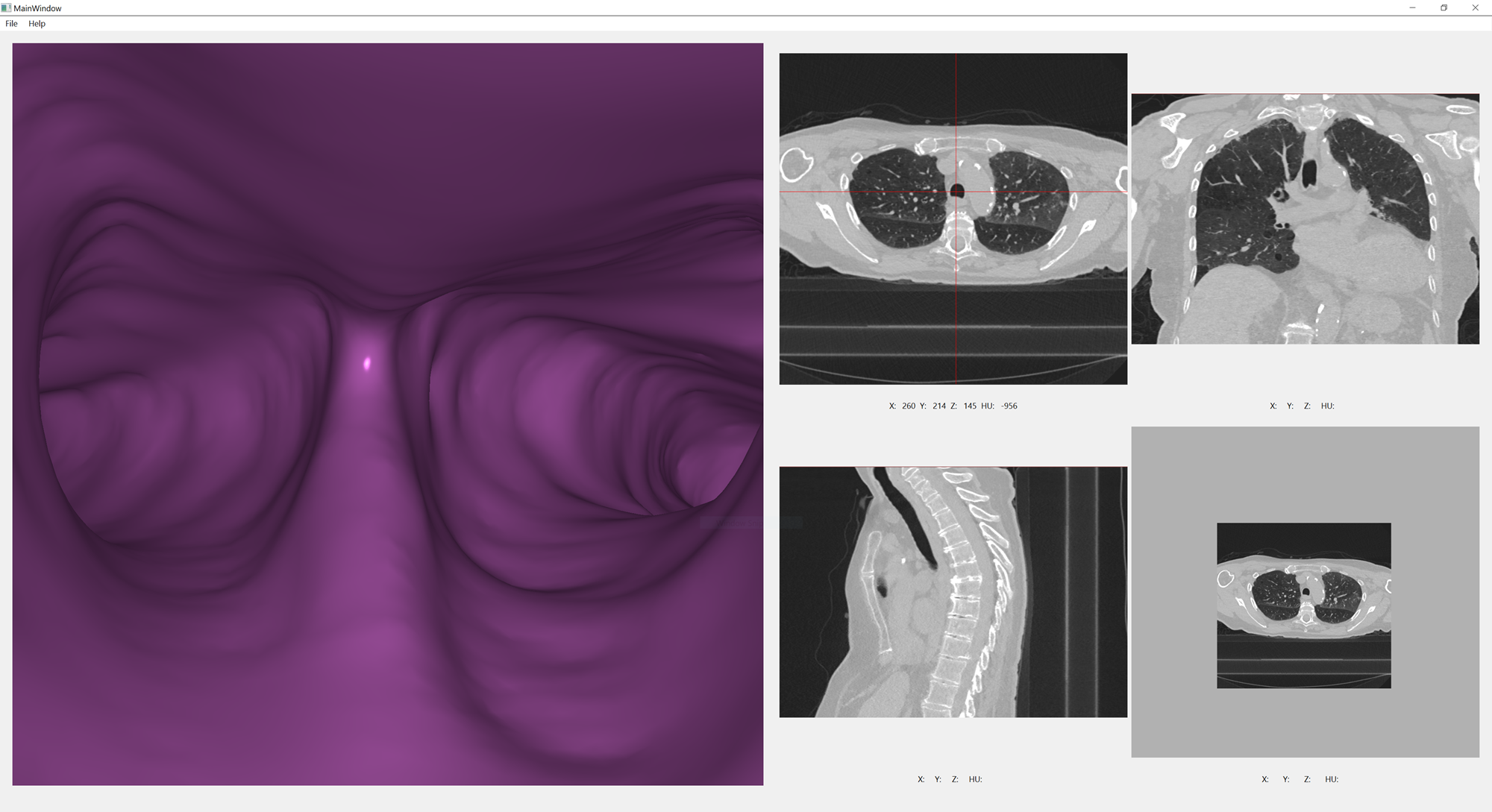
Airway Navigator User Interface
The CT slicers are all implemented on the GPU using compute shaders for general purpose computation without using the rendering pipeline. Each slice is computed by a plane sampling the CT volume at a particular pose (location and angle). I found the oblique slicer the most challenging because it had the most degrees of freedom. However… it became fundamental since the axial, sagittal and coronal slicers are simplifications of the oblique slicer.
In the following image the oblique slicer as remained centered at the airway main bifurcation, but has been reoriented to slice through the CT volume at an oblique angle. The red cross represents an arbitrarily sampled HU value of -443.
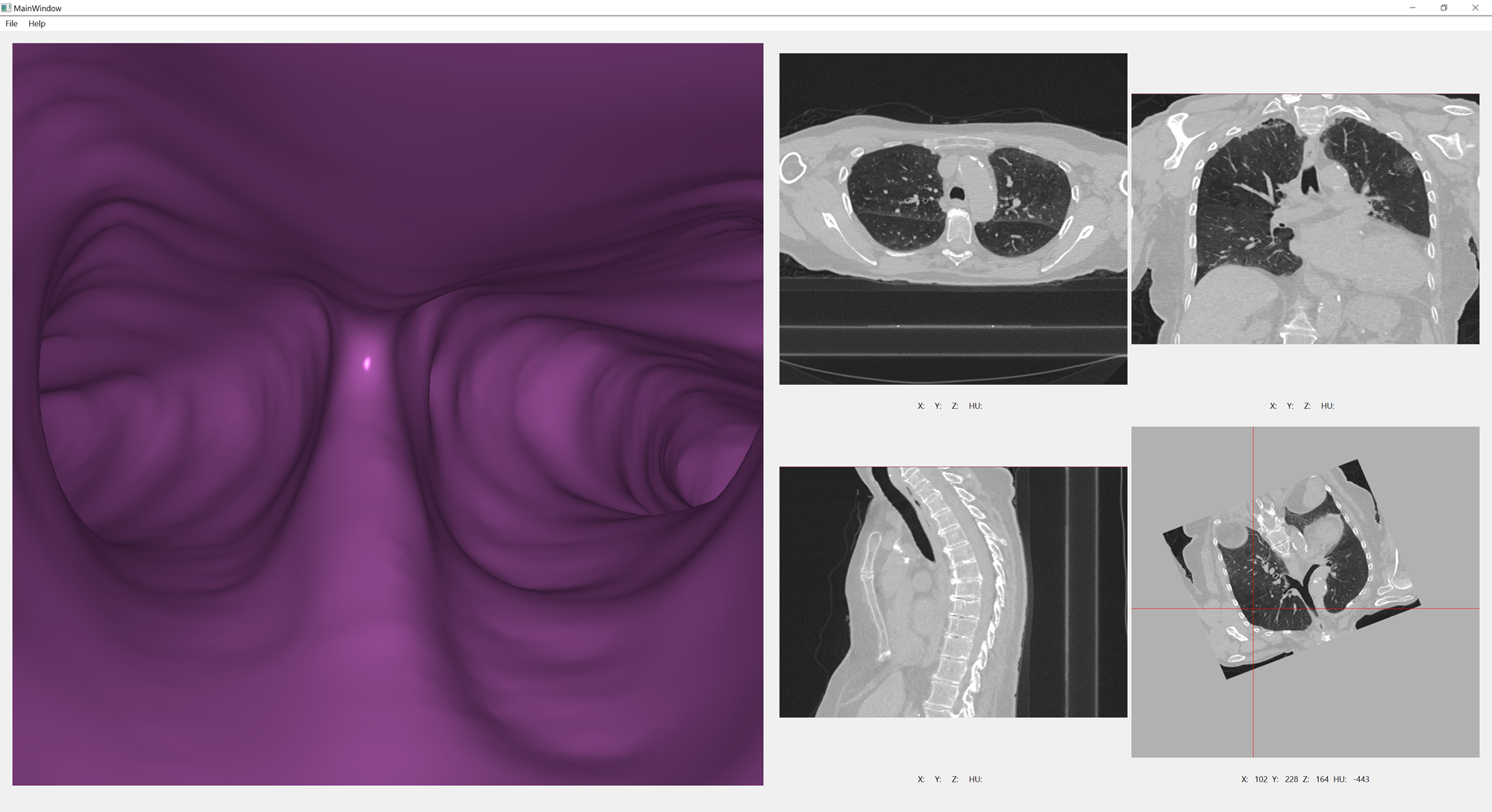
Oblique Slicer Reoriented
Oblique Slicer Compute Shader
The important detail in the compute shader is to appropriately compute texture location of the CT
Volume for each global invocation location. The compute shader is configured to run in parallel by
configuring the local_size_x, local_size_y and local_size_z to set the size of the work group.
A work group configures how many threads can share the same local memory. The optimal size of the
work group can vary between different hardware. Work group sizing may be more critical in
applications such as convolution image filtering.
Slice Texture Setup
The slice texture is configured as a 1024 x 1024 x 1 plane that will slices through the CT volume at an oblique angle.
int numChannels = 1;

// Allow the oblique slicer to host a drawing surface
int totalSize = m_TextureWidth * m_TextureHeight * numChannels; // 1024 x 1024 x 1

// Set all values to 255 and use only 1 channel (RED)
std::vector<unsigned char> blankTexture(totalSize, 255);

mmOpenGLClearErrorMacro();
glGenTextures(1, &m_SliceTexture);
glBindTexture(GL_TEXTURE_2D, m_SliceTexture);
glTexStorage2D(GL_TEXTURE_2D, 1, GL_R32F, m_TextureWidth, m_TextureHeight);
glTexSubImage2D(GL_TEXTURE_2D, 0, 0, 0, m_TextureWidth, m_TextureHeight, GL_RED, GL_UNSIGNED_BYTE, &blankTexture[0]);
glTexParameteri(GL_TEXTURE_2D, GL_TEXTURE_WRAP_S, GL_CLAMP_TO_BORDER);
glTexParameteri(GL_TEXTURE_2D, GL_TEXTURE_WRAP_T, GL_CLAMP_TO_BORDER);
glTexParameteri(GL_TEXTURE_2D, GL_TEXTURE_MIN_FILTER, GL_LINEAR);
glTexParameteri(GL_TEXTURE_2D, GL_TEXTURE_MAG_FILTER, GL_LINEAR);
mmOpenGLCheckErrorMacro("Error with initializing blank texture - OpenGL");
Compute Shader Dispatch
When the compute shader is dispatched, the camera position and angle will be passed to the compute shader. Note that the dispatch size (32 x 32 x 1) and the local size (32 x 32 x 1) covered the full image space (1024 x 1024 x 1).
mmOpenGLClearErrorMacro();
glBindImageTexture(0, m_CTTexture, 0, GL_TRUE, 0, GL_READ_ONLY, GL_R32F);
glBindImageTexture(1, m_SliceTexture, 0, GL_FALSE, 0, GL_WRITE_ONLY, GL_R32F);
glUseProgram(m_ComputeProgram);

glm::vec3 pos = m_Camera.GetModelOffset();
glm::mat3 rot = m_Camera.GetRotationMatrix();

glm::vec3 aspect = getAspectRatioVector();

glUniform3fv(glGetUniformLocation(m_ComputeProgram, "CTAspectRatio"), 1, &m_AspectRatio[0]);
glUniformMatrix3fv(glGetUniformLocation(m_ComputeProgram, "rotationMatrix"), 1, GL_FALSE, &rot[0][0]);
glUniform3fv(glGetUniformLocation(m_ComputeProgram, "positionVector"), 1, &pos[0]);

glUniform2iv(glGetUniformLocation(m_ComputeProgram, "sliceBounds"), 1, &m_SlicerBounds[0]);
glUniform3iv(glGetUniformLocation(m_ComputeProgram, "volumeBounds"), 1, &m_CTVolumeBounds[0]);
glUniform2fv(glGetUniformLocation(m_ComputeProgram, "textureResolution"), 1, &m_SlicerVoxelInMillimeters[0]);
glUniform3fv(glGetUniformLocation(m_ComputeProgram, "volumeResolution"), 1, &m_CTVolumeVoxelInMillimeters[0]);

switch (select)
{
case OBLIQUE:
    glDispatchCompute(32, 32, 1);
    break;
default:
    break;
}
glMemoryBarrier(GL_SHADER_IMAGE_ACCESS_BARRIER_BIT);
glBindImageTexture(0, 0, 0, GL_FALSE, 0, GL_WRITE_ONLY, GL_R32F);
glBindImageTexture(1, 0, 0, GL_FALSE, 0, GL_WRITE_ONLY, GL_R32F);
glUseProgram(0);
mmOpenGLCheckErrorMacro("Error with Selecting Slice - ObliqueSlicerBase");
3D CT Volume Sampling (Compute Shader)
Since the camera position and rotation is passed in to the compute shader through uniform variables, the sampling plane can be applied to the 3D volume. The CT Volume and Texture aspect ratios, bounds and resolutions are important because the CT Volume’s voxels are not isotropic unlike the textures used to store and represent it.
#version 460 core

layout (local_size_x = 32, local_size_y = 32, local_size_z = 1) in;
layout (binding = 0, r32f) uniform readonly highp image3D inputVolume;
layout (binding = 1, r32f) uniform writeonly highp image2D outputSlice;

//uniform mat4 view;
//uniform vec2 textureCenter;
//uniform vec4 cameraPos;

uniform vec3 positionVector;
uniform mat3 rotationMatrix;
uniform vec3 CTAspectRatio;
uniform ivec2 sliceBounds;
uniform ivec3 volumeBounds;
uniform vec2 textureResolution;
uniform vec3 volumeResolution;

//uniform int outputSliceHeight;
//uniform int outputSliceWidth;

// The global invocation treats the top left corner as (0,0) while the texture treats bottom left as (0,0)
// The texture's origin is then set to the middle of the texture. This is so that the center of the texture
//		is always at the voxel the camera is at in the 3D Volume.
ivec2 setGlobalInvocationToCenteredTextureCoord (ivec2 globalInvocationLocation, vec2 textureDim)
{
	int xLoc = (globalInvocationLocation.x) - int(round(float(textureDim.x)/2.0));
	int yLoc = (globalInvocationLocation.y) - int(round(float(textureDim.x)/2.0));

	return ivec2(xLoc, yLoc);
}

// Get the voxel that is part of the slice of the 3D volume determined by the camera's position and normal vector
vec4 voxelFrom3DVolume (ivec2 textLoc, vec3 volumeBounds)
{
	// pad zero to represent texture location in 3D
	// find position in the texture in terms of physical dimensions
	vec3 textLoc3D = vec3(textLoc.xy, 0.0);
	vec3 textLoc3DPhysical = vec3(textureResolution.xy, 0.0) * textLoc3D;

	// apply the translation and rotation matrix of the camera to texture slice
	// rotate the centered texture, move to camera position
	vec3 posInVolumePhysical = (rotationMatrix * textLoc3DPhysical) + (volumeResolution * positionVector);

	// get the voxel location from physical location
	vec3 posInVolume = vec3(posInVolumePhysical.x/volumeResolution.x,posInVolumePhysical.y/volumeResolution.y,posInVolumePhysical.z/volumeResolution.z);

	// position in texture should be an integer for loading a voxel
	ivec3 roundedPosInVolume = ivec3(round(posInVolume));

	// get voxel value for the corresponding location in the slice of the 3D volume
	vec4 voxelValue = imageLoad(inputVolume,roundedPosInVolume);

	return voxelValue;
}

void main()
{
	ivec2 globalInvo = ivec2(gl_GlobalInvocationID.xy);
	ivec2 textureLoc = setGlobalInvocationToCenteredTextureCoord(ivec2(gl_GlobalInvocationID.xy), sliceBounds);

	//

	imageStore(outputSlice,globalInvo,voxelFrom3DVolume(textureLoc, volumeBounds));
}
To Do
- Migrate the Slab Compute Shader and Viewer into the project.